

Choosing between QuickBooks Online and QuickBooks Desktop in 2026 can be challenging for UK businesses. Both versions offer powerful accounting features, but they are designed for different business needs. QuickBooks Online focuses on cloud accessibility, automation, and remote collaboration, while QuickBooks Desktop provides advanced inventory, reporting, and job costing features for more complex operations.
In this guide, we compare QuickBooks Online vs Desktop in detail – including pricing, features, reporting, payroll, inventory management, accessibility, and scalability — to help you choose the right version for your business.
Understanding the Main Differences
QuickBooks Desktop is a locally installed software with robust features. QuickBooks Online is cloud-based, offering flexibility and remote access. Your choice depends on your business requirements.
QuickBooks Online Features and Benefits
| Feature | QuickBooks Online | QuickBooks Desktop |
|---|---|---|
| Access | Cloud-based access from anywhere with internet connection | Installed locally on a desktop or server environment |
| Device Compatibility | Works on PC, Mac, tablets, and smartphones | Primarily Windows-based (limited Mac support) |
| Updates | Automatic cloud updates included | Manual or subscription-based updates required |
| Pricing Model | Monthly cloud subscription | Annual subscription licensing |
| User Access | Easy multi-user collaboration and remote access | Requires network or hosting setup for multi-user access |
| Backups | Automatic cloud backups managed by Intuit | Manual backups with full local control |
| Third-Party Integrations | Extensive app ecosystem and automation integrations | More limited integration options |
| Bank Feeds & Automation | Advanced bank feeds with automation and AI categorisation | Basic bank feeds with fewer automation features |
| Inventory Management | Basic inventory tracking for small businesses | Advanced inventory tools in Premier and Enterprise versions |
| Manufacturing Features | Limited manufacturing functionality | Supports bill of materials and assembly tracking |
| Job Costing | Basic project and job costing tools | Advanced job costing and estimate comparison features |
| Payroll | Standard payroll and HMRC compliance features | Advanced payroll allocation and detailed reporting |
| Reporting | Improved reporting with custom report builder tools | Extensive reporting and customisation capabilities |
| Forms Customisation | Limited invoice and form template customisation | Advanced form and document customisation options |
| IT Requirements | No dedicated server or IT infrastructure required | May require server setup and ongoing IT maintenance |
| Best Suited For | UK SMEs, remote teams, and cloud-first businesses | Inventory-heavy, manufacturing, and complex operational businesses |
Note: Features, integrations, and pricing structures may change depending on Intuit product updates and subscription plans in 2026.
Key Advantages
QuickBooks Online offers fully cloud-based accounting access, allowing businesses to work securely from anywhere with an internet connection. In 2026, the platform continues to improve automation, AI-powered transaction categorisation, mobile accounting functionality, and third-party integrations for UK SMEs.
Superior Features
Online banking integration stands out in QuickBooks Online. The system offers powerful bank feed connections, automated categorisation, and intelligent transaction suggestions. Automatic updates ensure you always have the latest features. The software evolves continuously without requiring manual updates or reinstallation.
Limitations
QuickBooks Online offers fewer customisation options for reports and forms. While improving with new tools like the custom report builder, it still lags behind Desktop. Inventory management is basic in QuickBooks Online. It lacks features like sales orders, bill of materials, and advanced tracking options needed by inventory-heavy businesses.
QuickBooks Desktop Features and Advantages
Standout Capabilities
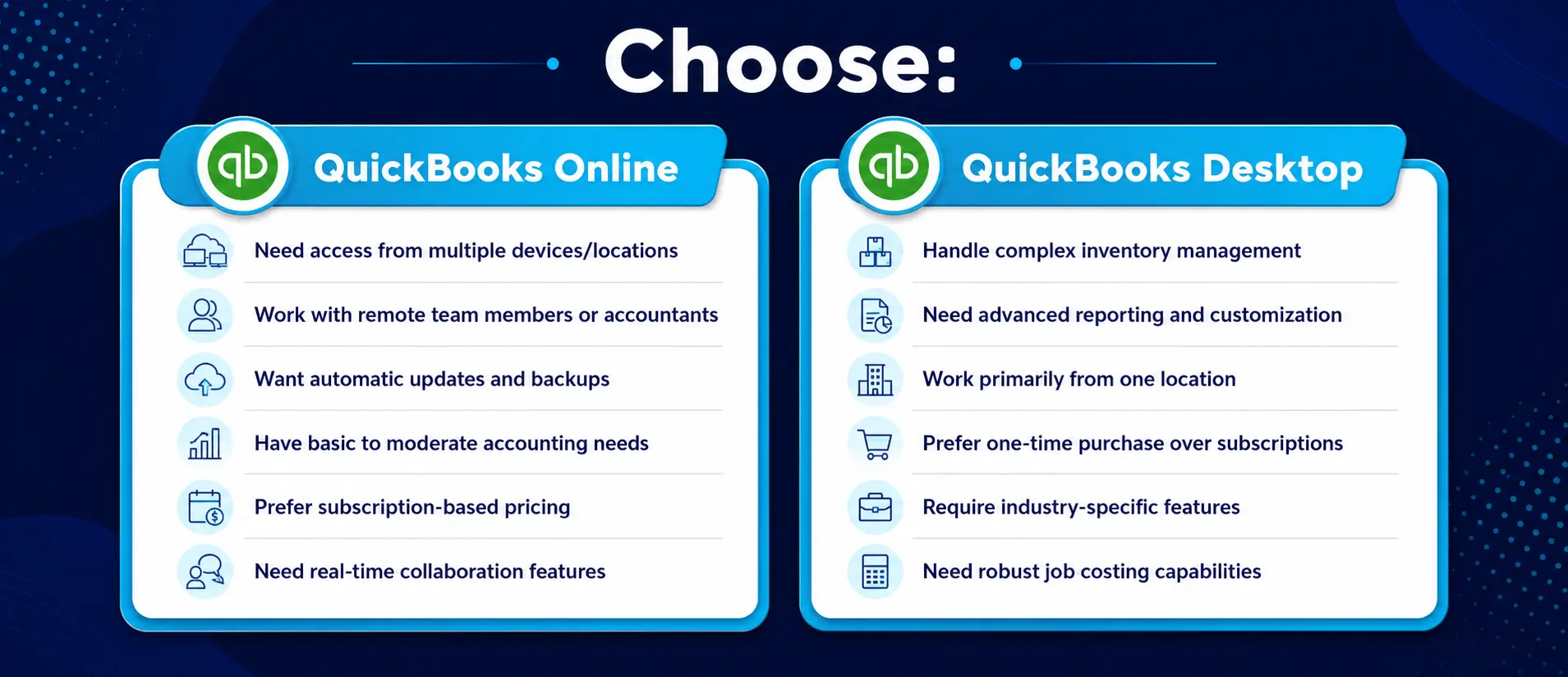
QuickBooks Desktop remains popular in 2026 among inventory-heavy, wholesale, manufacturing, and construction businesses that require advanced reporting, job costing, and stock management capabilities.
Advanced Options
Manufacturing businesses benefit from Desktop’s bill of materials feature. This allows tracking raw materials, labour, and overhead costs to determine finished goods pricing. Enterprise editions offer barcode scanning support. This includes mobile scanning options for picking, packing, and shipping workflows that streamline inventory operations.
Drawbacks
QuickBooks Desktop requires more technical setup. Multi-user environments need server configuration and proper networking, increasing IT complexity and cost. Since 2022, Desktop has moved to subscription pricing. This makes the cost difference between Online and Desktop smaller than in previous years.
QuickBooks Online vs Desktop Pricing and Business Suitability (2026)
QuickBooks Online and QuickBooks Desktop offer different pricing structures depending on features, number of users, and business requirements. The comparison table below highlights the typical pricing, user limits, and best-use scenarios for each version in 2026.
| Version | Starting Pricing | Users | Best For |
|---|---|---|---|
| QuickBooks Online Simple Start | From £15/month | 1 User | New businesses, freelancers, and very small UK businesses |
| QuickBooks Online Essentials | From £24/month | Up to 3 Users | Service-based UK SMEs needing invoicing and expense tracking |
| QuickBooks Online Plus | From £35/month | Up to 5 Users | Growing businesses needing cloud accounting and basic inventory management |
| QuickBooks Online Advanced | From £65/month | Up to 25 Users | Larger UK businesses requiring advanced reporting, automation, and workflow controls |
| QuickBooks Desktop Pro | From £400/year | Up to 3 Users | Businesses needing traditional desktop accounting features and local data control |
| QuickBooks Desktop Premier | From £600/year | Up to 5 Users | Industry-specific businesses needing advanced reporting and job costing |
| QuickBooks Desktop Enterprise | From £1,200/year | 1–40 Users | Inventory-heavy, wholesale, manufacturing, and complex businesses with advanced operational needs |
For Service-Based Businesses
Service businesses typically benefit from QuickBooks Online. The cloud accessibility, third-party integrations, and automated features suit businesses without complex inventory or manufacturing needs. Professional services firms, consultancies, and freelancers find QuickBooks Online’s
mobility particularly valuable. The ability to create invoices and track expenses on-the-go improves efficiency.
For Inventory-Heavy Businesses
Retail, wholesale, and manufacturing businesses often need QuickBooks Desktop. The advanced inventory tracking, sales orders, and manufacturing features are essential for these operations.
Construction companies benefit from Desktop’s superior job costing. The ability to compare estimated versus actual costs helps maintain profitability on projects.
For Growing Businesses
Startups and new businesses usually find QuickBooks Online easier to implement. The simplicity, lower initial costs, and lack of IT requirements make it accessible.
As businesses grow, some migrate to Desktop for advanced features. However, with QuickBooks Online continuously improving, this transition is becoming less necessary.
Recent QuickBooks Updates and Improvements (2026)
QuickBooks Online Improvements
QuickBooks Online has significantly improved its reporting capabilities. The new custom report builder tool offers more flexibility, narrowing the gap with Desktop.
Mobile functionality continues to expand in Online versions. The mobile app now allows invoice creation, expense tracking, and even basic inventory management.
QuickBooks Desktop Changes
Since 2022, QuickBooks Desktop has moved to a subscription-only model. This eliminates the one-time purchase option previously available to users.
The pricing structure change has made Desktop and Online more comparable in cost. This shifts the decision focus more toward features rather than price difference.
Security, Backups, and Accessibility
Cloud Security vs. Local Control
QuickBooks Online offers automatic backups managed by Intuit. This eliminates manual
backup processes but reduces control over your historical data.
Desktop gives complete control over backups and data storage. This appeals to businesses with strict data retention policies or regulatory requirements.
Accessibility Trade-offs
Online versions provide always-on accessibility with proper internet connection. This facilitates remote work and multi-location business operations.
Desktop versions work without internet but limit remote access. Hosting services can provide remote access to Desktop versions at additional cost.
Final Verdict
Choosing between QuickBooks Online and Desktop depends on your unique business needs. Online offers convenience and accessibility, while Desktop provides power and control. For many modern small businesses, QuickBooks Online provides sufficient functionality with the added benefit of automatic updates and anywhere access.
Businesses with complex inventory, manufacturing needs, or detailed job costing requirements may still benefit from QuickBooks Desktop’s advanced capabilities. Consider your business growth trajectory when deciding. The right accounting software will scale with your business and support your financial management needs as you expand.
At Outbooks UK, our bookkeeping and cloud accounting specialists regularly help UK businesses choose, implement, and migrate between accounting software platforms including QuickBooks, Xero, Sage, and FreeAgent.
FAQs
Can I switch from QuickBooks Desktop to Online?
Yes, Intuit offers migration tools. However, some features don’t transfer perfectly, and customisations may need to be rebuilt in the Online version.
Does QuickBooks Online work without internet?
No, QuickBooks Online requires internet access. For areas with unreliable connections, Desktop might be more suitable.
Which version has better customer support?
Both offer similar support options. Online users report slightly faster resolution times, while Desktop users can also seek help from certified ProAdvisors.
Can QuickBooks Desktop handle multiple business locations?
Yes, especially in Enterprise editions. Advanced inventory features allow tracking stock across multiple sites with detailed reporting.
Does QuickBooks Online support manufacturing businesses?
QuickBooks Online has limited manufacturing support. Businesses needing bill of materials and assembly tracking should consider Desktop Premier or Enterprise.

Parul is a content specialist with expertise in accounting and bookkeeping. Her writing covers a wide range of accounting topics such as payroll, financial reporting and more. Her content is well-researched and she has a strong understanding of accounting terms and industry-specific terminologies. As a subject matter expert, she simplifies complex concepts into clear, practical insights, helping businesses with accurate tips and solutions to make informed decisions.