
Errors in Xero bookkeeping can lead to wasted time, cash flow issues, and potential HMRC penalties. Even small mistakes, such as incorrect VAT coding, duplicate transactions, or unreconciled bank accounts, can quickly create larger financial and compliance problems.
For many UK small business owners and company directors, the challenge isn’t a lack of knowledge it’s a lack of time. As bookkeeping tasks fall behind, common Xero errors can affect reporting accuracy, VAT submissions, and day-to-day financial visibility.
This guide highlights the most common Xero bookkeeping mistakes UK businesses make and explains how outsourced bookkeeping teams use proven processes, automation, and specialist expertise to fix them and prevent them from happening again.
This guide covers:
- The six most common Xero bookkeeping mistakes UK businesses make
- How these errors affect VAT returns and financial reporting
- Practical fixes that outsourced Xero bookkeeping teams use
1. Bank Reconciliation Delays
This is one of the most common issues we see in Xero bookkeeping for small businesses. It starts small but creates significant problems over time
The Problem:
Bank reconciliation in Xero gets pushed to “next week”, weeks turn into months. By the time you reconcile, you’re facing hundreds of unmatched transactions, duplicate entries, and mystery payments you can’t trace. Late reconciliation makes spotting errors nearly impossible.
How Outsourcing Teams Fix It:
Outsourced Xero bookkeeper teams reconcile daily or weekly depending on transaction volume. They match bank feeds immediately using Xero’s “Find & Match” function.
Their systematic approach includes:
- Setting reconciliation schedules based on your payment cycles
- Flagging unexplained transactions immediately for review
- Using “Remove and Redo” instead of deleting to maintain audit trails
- Locking periods after reconciliation to prevent accidental changes
2. Poor Transaction Categorisation
Messy categorisation destroys the accuracy of your financial reports and makes tax calculations unreliable.
The Problem:
Everything gets dumped into “General Expenses.” Your Chart of Accounts is either Xero’s generic default or a confusing mess. This destroys your management accounts. You can’t see where money actually goes. Tax calculations become guesswork.
How Outsourcing Teams Fix It
Professional Xero bookkeeping services begin by auditing your Chart of Accounts. They then restructure it to reflect how your business actually operates. Next, they create bank rules for recurring transactions, such as rent, utilities, and regular supplier payments. This helps automate categorisation, improve consistency, and reduce human error.
What Gets Miscoded?
| Common Mistake | Correct Treatment |
|---|---|
| Equipment purchases | Fixed asset (capitalised) |
| Subcontractor payments recorded as staff costs | Subcontractor expenses |
| Director’s personal spending recorded as a business expense | Director’s loan account |
3. Duplicate Transactions
Duplicate transactions in Xero are surprisingly common and can seriously distort your financial picture. These Xero errors often go unnoticed until month-end reporting reveals inflated expenses.
The Problem:
You create a new “Spend Money” transaction instead of matching it to an existing bill. Or you import bank feeds twice. Duplicate transactions inflate your expenses and wreck your profit figures. They make cash flow forecasting useless and raise red flags during audits.
How Outsourcing Teams Fix It:
Virtual Xero bookkeeping teams always check for existing bills before creating new transactions. They use “Find & Match” religiously.
Their duplication prevention process:
- Always check for existing bills before creating new transactions
- Configure automatic matching in Hubdoc or Dext
- Run monthly exception reports to catch duplicates
- Review same-day, same-amount transactions from identical suppliers
4. Mixed Personal and Business Spending
Blurring the line between personal and business expenses creates serious compliance risks for Ltd companies.
The Problem:
You use the business account for personal expenses “just this once.” That happens repeatedly. Now your bookkeeping is a nightmare, and your actual business profitability is hidden under personal spending. For Ltd companies, this also weakens the corporate structure that protects you personally.
How Outsourcing Teams Fix It:
Outsourced Xero bookkeeping specialists separate everything strictly. They set up proper director loan accounts to track any personal expenses paid from business funds.
They implement clear protocols:
- Separate business cards for all company spending
- Clear expense policies that everyone understands
- Proper reimbursement processes for legitimate business expenses
- Regular director loan account reviews to maintain compliance
5. VAT Coding Errors
Getting VAT in Xero wrong is one of the costliest mistakes for UK businesses, especially under Making Tax Digital.
Under HMRC’s points-based penalty system introduced in 2025, businesses face a £200 fixed penalty once they reach the threshold for late submissions.
The Problem:
Wrong VAT rates get applied. You reclaim VAT when you shouldn’t. Zero-rated and exempt supplies get confused. VAT errors are expensive. Making Tax Digital means HMRC spots discrepancies fast.
From April 2025, late VAT payments incur a 3% penalty at day 15 and another 3% at day 30, with daily penalties of 10% per annum from day 31 onwards.
How Outsourcing Teams Fix It:
Xero bookkeeping outsourcing teams ensure every transaction has correct VAT treatment. They stay current with HMRC guidance, especially for complex areas like construction reverse charge or partial exemption.
Before submitting any VAT return, they validate Xero’s figures against manual reconciliations to ensure financial data accuracy.
Common corrections they make:
- Properly separating zero-rated exports from exempt supplies
- Applying 5% reduced rates correctly for energy-saving installations
- Recording postponed VAT accounting for imports
6. Ignoring Automation Features
Manual data entry wastes time and introduces preventable errors into your bookkeeping in Xero.
The Problem:
You manually type every transaction into Xero. No bank rules. No Hubdoc. No automated invoice capture. This wastes hours and guarantees errors through fatigue and repetition. Your month-end accounts arrive weeks late, making them useless for decisions.
How Outsourcing Teams Fix It
Bookkeeping services automate workflows to improve accuracy and save time:
| Tool | Function | Benefit |
|---|---|---|
| Hubdoc | Captures receipts automatically | Eliminates manual data entry |
| Bank Rules | Auto-categorises transactions | Improves consistency and saves time |
| A2X | Reconciles e-commerce sales | Supports accurate financial reporting |
Additional automation measures may include automated invoice reminders, supplier bill processing, and payroll software integration.
Advanced Fixes Professional Teams Use
Beyond addressing individual mistakes, outsourced Xero accounting support teams implement deeper system improvements that prevent recurring errors.
Mass Corrections with Find and Recode
When they audit a new client with hundreds of miscoded transactions, they use Xero’s “Find and Recode” feature to change categories, tracking, or VAT codes across multiple transactions at once.
Period Locking
After completing monthly reconciliation and accounts, they lock that period. This prevents accidental changes that would mess up comparative reporting or filed VAT returns.
Proper User Permissions
They set up user access properly:
- Only authorised people access sensitive financial data
- Those entering transactions can’t approve payments
- Invoice creators can’t process supplier bills
- Clear separation of duties reduces fraud risk
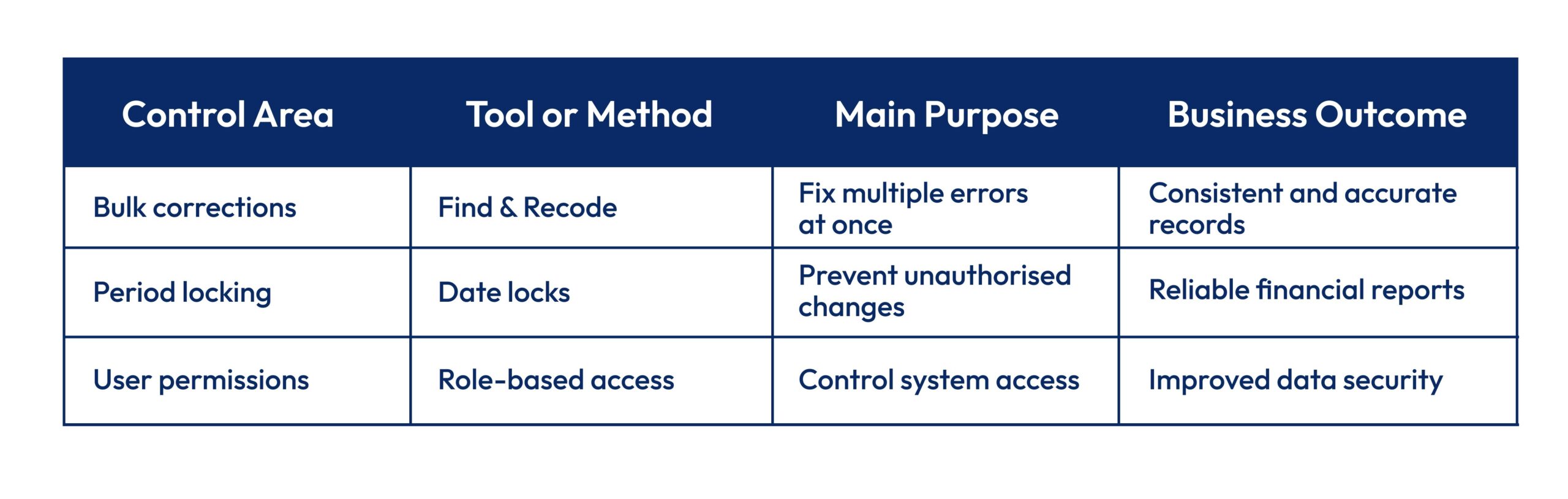
These structured controls help prevent repeated bookkeeping errors and protect financial records. By combining bulk corrections, period locking, and controlled access, professional teams maintain long-term data accuracy and compliance. This approach reduces manual corrections and strengthens reporting reliability.
Why Outsourcing Makes Financial Sense?
The business case for hiring a Xero bookkeeper goes beyond just fixing errors it’s about reclaiming time and reducing risk. MTD for Income Tax starts from April 2026 for those with income over £50,000, adding another compliance layer for business owners.
UK small businesses spend approximately an average of 44 hours on tax admin, according to the Federation of Small Businesses. Outsourcing converts that time into revenue-generating work.
The numbers often favour outsourcing too. Xero bookkeeping services typically cost less than internal staff time plus error corrections plus potential penalties. You get Xero-certified professionals with current HMRC knowledge without employment costs.
What you gain:
- Accurate monthly accounts for better decisions
- Proactive tax planning from experienced professionals
- Easy scaling as your business grows
- Confidence that bookkeeping meets regulatory standards
Conclusion
Bank reconciliation delays, VAT errors, duplicate transactions, poor categorisation these Xero bookkeeping mistakes create real problems. HMRC compliance issues, inaccurate financial data, wasted time fixing errors.
Outsourcing Xero bookkeeping services eliminate these through systematic processes, specialist knowledge, and smart use of cloud accounting automation. They maintain HMRC compliant and MTD compliant standards, deliver timely reporting, and provide genuine value beyond their cost.
For Ltd company directors and accountants wanting reliable Xero accounting support, outsourcing transforms bookkeeping from a burden into an advantage giving you accurate financial insights that drive better decisions.
FAQs
Why does my Xero not reconcile?
Usually unmatched bank feed transactions, wrong opening balances, or duplicate entries. Check for imported bank statements that didn’t match existing bills, and verify your opening balance matches your first statement.
How to fix bookkeeping mistakes in Xero?
Use “Find and Recode” for bulk corrections, or edit individual transactions through bank reconciliation. Always “Remove and Redo” rather than delete to keep audit trails intact.
Is Xero bookkeeping easy for small businesses?
The interface is straightforward, but accurate bookkeeping needs knowledge of UK tax rules, VAT coding, and proper setup. Most small businesses benefit from professional help for complex transactions.
Can outsourced accountants manage Xero?
Yes, outsourced professionals access your Xero securely with permissions you control. They handle daily bookkeeping, reconciliation, and reporting. You keep full visibility and ownership of your data.
Is Xero bookkeeping HMRC compliant?
Xero is HMRC recognised for Making Tax Digital. But compliance depends on correct usage accurate VAT coding, timely submissions, proper records. Professional services ensure your setup meets HMRC requirements.

Parul is a content specialist with expertise in accounting and bookkeeping. Her writing covers a wide range of accounting topics such as payroll, financial reporting and more. Her content is well-researched and she has a strong understanding of accounting terms and industry-specific terminologies. As a subject matter expert, she simplifies complex concepts into clear, practical insights, helping businesses with accurate tips and solutions to make informed decisions.