
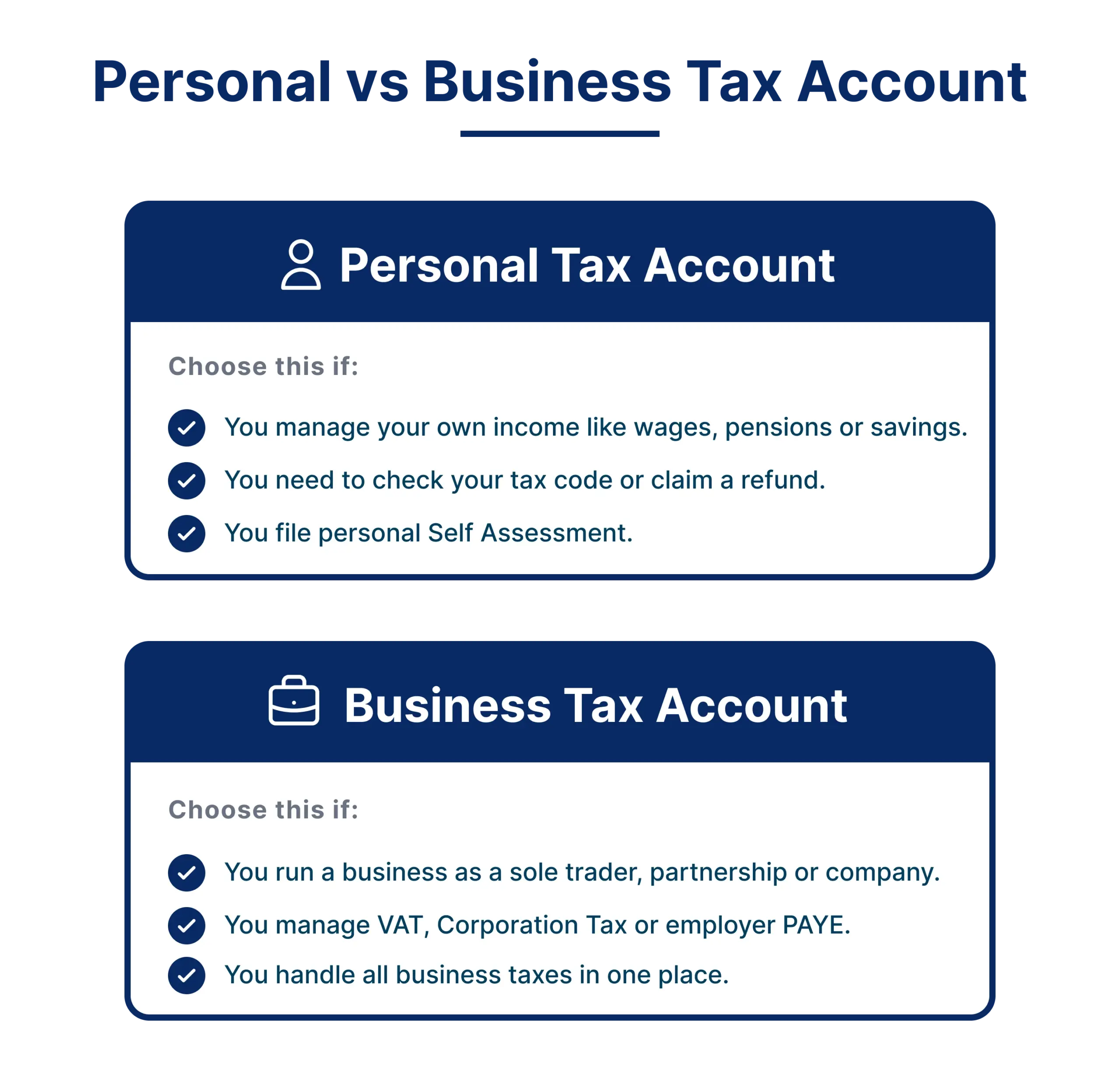
The Personal Tax Account manages your individual taxes including Income Tax, National Insurance and State Pension. The Business Tax Account handles business obligations including VAT, Corporation Tax and PAYE. Most sole traders and limited company directors need both.
HMRC runs two separate digital platforms. Getting the distinction wrong leads to missed deadlines, incorrect filings and avoidable penalties. This blog explains what each account does, who needs which and what has changed in 2026.
Key takeaways
- The Personal Tax Account covers individual taxes. The Business Tax Account covers business obligations. Most sole traders and directors need both.
- Both accounts use a single Government Gateway login. No separate credentials are required.
- From February 2026, new HMRC sign-ins use GOV.UK One Login. Existing Government Gateway users continue as normal.
- MTD for Income Tax went live on 6 April 2026 for sole traders and landlords with qualifying income above £50,000.
What is a Personal Tax Account?
The HMRC Personal Tax Account is your online portal for managing individual tax affairs. It is designed for anyone who pays tax as a private citizen, whether employed, self-employed or receiving a pension.
Through the Personal Tax Account you can view your tax code, check your National Insurance record, forecast your State Pension and update personal details. The PTA gives you a complete picture of your personal financial relationship with HMRC, accessible through your Government Gateway login at any time.
HMRC introduced the Personal Tax Account in 2015. Its Q3 2025/26 performance update recorded 95.8 million Personal Tax Account user sessions and 33.0 million Business Tax Account sessions to the end of December 2025, alongside 112.3 million sessions on the HMRC app.
What you can manage through your Personal Tax Account:
- View your Income Tax estimate and tax code
- Check your National Insurance contributions record
- Track your State Pension forecast
- Manage Self-Assessment if you are self-employed as an individual
- Claim Marriage Allowance or update Child Benefit details
- Report changes to personal circumstances such as address or name
- View and print your tax year overview and tax calculations
- Check if you are owed a tax refund
The system covers you as an individual taxpayer only, not any business entity you operate.
What is a Business Tax Account?
The Business Tax Account is HMRC’s hub for managing all business tax obligations. Whether you run a sole trader operation, a limited company or a partnership, the BTA gives you access to over 40 different business taxes and schemes.
This is where you register for VAT, set up PAYE when you hire staff, file Corporation Tax returns and manage other business-specific compliance requirements. The platform lets you check deadlines, view payment history and grant access to your accountant or team members.
What you can manage through your Business Tax Account:
- Register for business taxes including VAT, PAYE and Corporation Tax
- File business tax returns and submit payments
- View payment deadlines and transaction history
- Manage multiple business taxes in one place
- Grant access to your accountant or team members
- Track business tax obligations and compliance status
- Submit Making Tax Digital VAT returns
- Submit MTD for Income Tax quarterly updates, mandatory from April 2026 for income above £50,000
- Manage Construction Industry Scheme obligations if applicable
Unlike the PTA, this system is built around the business entity itself, not the individual behind it.
GOV.UK One Login: The 2026 change to how you sign in
From February 2026, HMRC began moving new sign-ups to GOV.UK One Login, a single credential designed to replace Government Gateway across all UK government services over time. Existing Government Gateway users continue to sign in as normal until HMRC migrates them. Anyone setting up a new tax account in 2026 is likely to be directed through GOV.UK One Login first.
Two practical points to note:
- If you already have a Government Gateway login, keep using it. You do not need to switch voluntarily.
- If you are setting up a new account, you will likely use GOV.UK One Login. Identity verification is similar, requiring a passport or driving licence plus a payslip or P60, but the system itself is different.
This change does not affect the Personal Tax Account or Business Tax Account dashboards. It only changes the sign-in experience.
Key differences between Personal Tax Account and Business Tax Account
| Feature | Personal Tax Account | Business Tax Account |
|---|---|---|
| User Type | Individuals: employees, self-employed, pensioners | Business entities: sole traders, limited companies, partnerships |
| Primary Purpose | Manage personal Income Tax and National Insurance | Manage business taxes and regulatory compliance |
| Taxes Covered | Income Tax, Self-Assessment (personal), NI contributions, State Pension | VAT, PAYE, Corporation Tax, MTD ITSA, Self-Assessment (business) |
| Income Reported | Salary, dividends, rental income, foreign income | Business profits, expenses, capital allowances |
| Access Control | Individual access with option to authorise an agent | Administrator can grant team or agent access |
| Tax Rates Applied | Personal income tax bands: 20%, 40%, 45% | Corporation Tax rates or business-specific rates |
| Who Sets It Up | Any UK taxpayer | Business owners, directors, sole traders |
| MTD Compliance | Not required | Required for VAT-registered businesses and from April 2026 for ITSA-mandated income |
Using the wrong account, or failing to use both when required, can result in missed deadlines, incorrect filings and HMRC penalties.
Who needs which Account?
Your business structure determines which HMRC online services you need. Use this checklist:
- Employed only: Personal Tax Account only
- Sole trader: Both accounts
- Limited company director: Both accounts for different purposes
- Partner in a partnership: Both accounts
- VAT registered: Business Tax Account required
- Employing staff: Business Tax Account required
- Sole trader or landlord with qualifying income above £50,000: Business Tax Account required for MTD ITSA quarterly updates
Individuals and Employees
If you are employed and receive a salary through PAYE, use the Personal Tax Account to check your tax code, view your Income Tax estimate and manage your National Insurance record. You do not need a Business Tax Account unless you have business income.
Sole Traders
Sole traders are both individual taxpayers and business operators. You need both accounts:
- Personal Tax Account: to view your NI record and manage personal tax affairs
- Business Tax Account: to register for Self-Assessment, file your return, manage VAT if your turnover exceeds £90,000 and submit MTD ITSA quarterly updates if your qualifying income is above £50,000
You use the same Government Gateway login, or GOV.UK One Login if you signed up after February 2026, to access both systems.
Limited Company Directors
As a limited company director, you interact with both systems in different ways:
- Personal Tax Account: for personal Income Tax on salary and dividends received from the company
- Business Tax Account: for the company’s Corporation Tax, PAYE for any employees and VAT registration
Your limited company is a separate legal entity. Its Corporation Tax account sits entirely within the BTA. Your personal earnings from the company flow through your PTA.
Partnerships
Partnerships file their own returns through the Business Tax Account. Individual partners report their share of profits through their Personal Tax Accounts. This split ensures both business and personal tax compliance.
Note: Landlords with rental income report through the Personal Tax Account via Self-Assessment, not through a Business Tax Account, unless the property rental is run as a limited company. From 6 April 2026, landlords with qualifying gross income above £50,000 from self-employment and property combined must also submit MTD ITSA quarterly updates through the BTA.
How to Access both Accounts?
Both accounts are accessed through a single sign-in. Existing users continue with Government Gateway. New users from February 2026 use GOV.UK One Login. The process is otherwise the same.
Accessing your Personal Tax Account:
- Go to gov.uk/personal-tax-account
- Click Sign in and enter your Government Gateway user ID and password, or sign in via GOV.UK One Login if prompted
- Enter the 6-digit security code sent to your phone
- You will land on your Personal Tax Account dashboard
Accessing your Business Tax Account:
- Go to gov.uk/log-in-register-hmrc-online-services
- Sign in with the same credentials
- Your dashboard will show all business taxes you are registered for
- To add a new tax such as VAT or PAYE, select Get online access to a tax, duty or scheme
You do not need a separate login for each account.
Understanding Business Tax Obligations in 2026
VAT Registration
Required when your taxable turnover exceeds £90,000. The VAT threshold remains at £90,000 for 2026 per HMRC guidance. You manage VAT through the BTA, submitting returns quarterly or monthly depending on your scheme.
PAYE for Employers
If you employ staff, you must register for PAYE and report payroll information in real time through the BTA.
Corporation Tax
Limited companies pay Corporation Tax on profits. HMRC’s Corporation Tax rates for 2026 are:
- 19% for profits up to £50,000 (small profits rate)
- 25% for profits over £250,000 (main rate)
- Marginal relief applies for profits between £50,000 and £250,000
Self-Assessment for Business
Sole traders and partners file Self-Assessment returns reporting business income and expenses. This happens through the BTA but connects to your personal tax calculation.
MTD for Income Tax
From 6 April 2026, sole traders and landlords with qualifying gross income above £50,000 must keep digital records and submit four quarterly updates through MTD-compatible software, followed by a Final Declaration by 31 January each year. The £30,000 threshold follows from April 2027 and £20,000 from April 2028. HMRC has confirmed a soft-landing period in 2026/27, meaning no penalty points will be issued for late quarterly updates.
Setting up your Accounts
Before you start, have these documents ready:
- National Insurance number
- Recent payslip, P60 or P45
- Valid UK passport or driving licence
- Mobile phone for two-factor authentication
- Business UTR number for Business Tax Account only
- Company registration number for limited companies only
Steps to create your Personal Tax Account
| Step | Action | Requirements |
|---|---|---|
| 1 | Visit the Personal Tax Account page on GOV.UK and click Sign in | Use existing Government Gateway ID or create a new GOV.UK One Login |
| 2 | Verify identity if prompted | National Insurance number, recent payslip or P60, photo ID |
| 3 | Access dashboard | Check tax code, Self-Assessment, refunds, Child Benefit, State Pension. Set up 2FA |
Steps to create your Business Tax Account
| Step | Action | Requirements |
|---|---|---|
| 1 | Log in to the HMRC online services page | Sign in with Government Gateway ID or set up a GOV.UK One Login |
| 2 | Select Business Tax Account and register for taxes | UTR, company registration number, business address |
| 3 | Complete verification and 2FA | Access dashboard for registered taxes |
The HMRC helpline on 0300 200 3310 can provide support if you encounter issues during registration. Lines are open Monday to Friday, 8am to 6pm.
Common Scenarios
Scenario 1: Starting as a Sole Trader
Register for Self-Assessment through the Business Tax Account before 5 October following the end of the tax year in which you started trading. File your first return by the following 31 January.
Continue using your Personal Tax Account for your NI record and personal tax code, particularly if you have employment income alongside self-employment.
If you started self-employment in the 2025/26 tax year, the registration deadline is 5 October 2026. Late registration can result in a failure to notify penalty. The 2025/26 online return is due by 31 January 2027.
Scenario 2: Moving from Sole Trader to Limited Company
When you incorporate:
- Close your Self-Assessment for business income as sole trading ceases
- Register the new company for Corporation Tax within three months
- Set up a Corporation Tax account in the BTA
- Continue using your PTA for personal Income Tax on salary and dividends from the company
This transition is a point where professional advice from an accountant can prevent compliance gaps.
Scenario 3: Managing multiple businesses
If you operate several businesses or companies, you can manage all of them through a single Government Gateway login. Each business entity gets its own section within the Business Tax Account, allowing you to switch between them.
Note: Accountants or agents managing taxes on behalf of clients need a separate Agent Services Account, which is different from a standard Business Tax Account.
Scenario 4: Preparing for MTD ITSA
From 6 April 2026, sole traders and landlords with qualifying gross income above £50,000 must submit quarterly updates through MTD-compatible software. The BTA is where you confirm registration and view submission status. The quarterly updates themselves are filed through compatible software such as Xero, QuickBooks, FreeAgent or Sage. If your qualifying income crossed £50,000 in 2025/26, you should already be set up. If it crosses the threshold during 2026/27, you will be brought into MTD for the following tax year.
Common Problems and Solutions
Problem: I cannot see my Business Tax Account after logging in.
Sign in directly at gov.uk/log-in-register-hmrc-online-services. If you have not yet added any business taxes, select Add a tax, duty or scheme from the dashboard.
Problem: My Government Gateway ID is not working.
Your Government Gateway user ID is a 12-digit number, not your email address or National Insurance number. Check your original registration email from HMRC. If you cannot find it, use the I have lost my user ID recovery option on the sign-in page.
Problem: I registered for Self-Assessment but cannot see it in my account.
HMRC can take up to 10 working days to activate your Self-Assessment after registration. If it has been longer, call HMRC on 0300 200 3310.
Problem: I need to give my accountant access to my Business Tax Account.
From your BTA dashboard, go to Manage account then Add a team member. Your accountant will need their Agent Reference Number to be authorised.
Problem: I have been redirected to GOV.UK One Login but my old Government Gateway details do not work there.
This is expected. GOV.UK One Login is a separate identity service. Existing Government Gateway users should continue using the Government Gateway sign-in route until HMRC migrates them. Creating a new GOV.UK One Login from scratch can split your tax records across two identities.
Conclusion
The Personal Tax Account and Business Tax Account serve distinct purposes. Getting the distinction right is essential for staying compliant and avoiding penalties.
Sole traders using both accounts correctly capture all personal and business tax responsibilities in one place. Limited company directors need both systems to manage personal Income Tax separately from Corporation Tax.
In 2026, two changes matter most: the move to GOV.UK One Login for new sign-ups from February, and the launch of MTD for Income Tax on 6 April 2026 for income above £50,000. If you are unsure which account to use or need help staying compliant, a qualified accountant can prevent penalties and ensure you are using HMRC’s systems correctly from the start.
Frequently Asked Questions
What is the difference between Personal Tax Account and Business Tax Account?
The Personal Tax Account manages your individual Income Tax, National Insurance and personal allowances. The Business Tax Account handles business taxes such as VAT, Corporation Tax and PAYE.
How do I know if I need a Business Tax Account?
You need one if you are self-employed, run a limited company, employ staff or are VAT registered. From April 2026, it is also required for MTD ITSA quarterly updates if your qualifying income exceeds £50,000.
Can I use the same login for both accounts?
Yes. Your Government Gateway user ID or GOV.UK One Login gives you access to both accounts through the same credentials.
When should sole traders use each account?
Use the Business Tax Account to register for Self-Assessment, file business returns and submit MTD ITSA updates. Use the Personal Tax Account to check your NI record and manage personal allowances.
Do limited company directors need both accounts?
Yes. The Personal Tax Account covers personal Income Tax on salary and dividends. The Business Tax Account covers Corporation Tax, PAYE and VAT.
Does MTD for Income Tax change which account I use?
No. MTD ITSA returns are filed through compatible software such as Xero or FreeAgent, not directly through the BTA. The BTA is where you confirm registration and view submission status.
Is the HMRC app the same as the Personal Tax Account?
Not exactly. The HMRC app provides mobile access to core Personal Tax Account features including your tax code and NI record. The full Personal Tax Account on GOV.UK offers more functionality. The app recorded 112.3 million sessions in 2025/26.

Parul is a content specialist with expertise in accounting and bookkeeping. Her writing covers a wide range of accounting topics such as payroll, financial reporting and more. Her content is well-researched and she has a strong understanding of accounting terms and industry-specific terminologies. As a subject matter expert, she simplifies complex concepts into clear, practical insights, helping businesses with accurate tips and solutions to make informed decisions.